01TIMER.COM / Timing system guides / CS-003 mode planning
Choosing a Test Mode Before Setting Up the CS-003 Kit
Dash timing and lap timing produce different records. One has a defined start and finish; the other depends on repeated passages and lap order. The CS-003 supports both types of work, which makes a written mode decision the first setup step.
Start with the result the coach will review
Write a one-sentence result definition. For a dash, it might be elapsed time from the selected start event to the finish crossing. For a lap drill, it should state whether the coach needs each lap, a total time or both. That sentence determines the course and the result sheet.
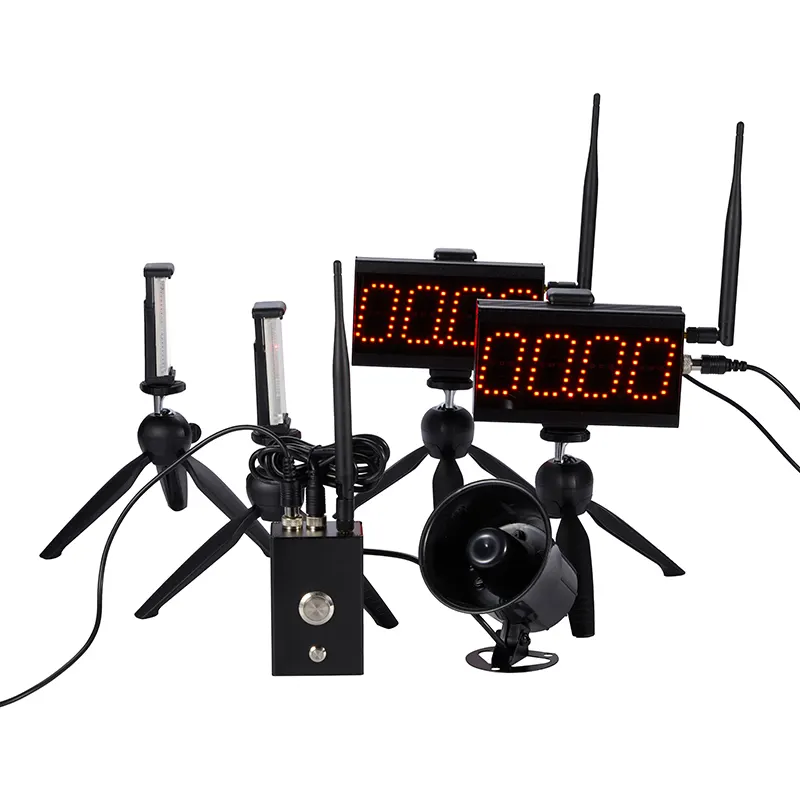
The current CS-003 product page describes dash timing, lap timing and flexible event modes in one compact platform. It lists training centers, clubs and compact test lanes as its intended settings. Those options are useful when each session block has one clear purpose.
Make a test mode card for the operator
A test mode card is shorter than a manual. Put the test name at the top, followed by the selected timing mode, start rule, trigger locations, reset action and fields to record. Keep the full manual nearby for setup details, but let the card guide the repeated work between athletes.
| Mode decision | Dash session | Lap session |
|---|---|---|
| Course | One measured start-to-finish lane | Closed or repeated route with a pass point |
| Result | Elapsed time for one attempt | Lap sequence, total or both |
| Identity | Athlete and attempt number | Athlete, lap number and sequence |
| Reset | After each completed run | According to the selected lap workflow |
Confirm the package before building the lane
The product page says the controller, laser sensors, tripod kit and carry case vary by package. It also directs buyers to confirm power accessories, timing accuracy and communication conditions for the selected model and operating mode. Match the delivered parts to the manual before deciding where each item goes.
If the result needs to be read from farther away, the page says an optional LED display can be quoted. Confirm display compatibility instead of treating any timing display as interchangeable. The setup support page is the right route for a package or operating question that the manual does not settle.
Test each trigger in course order
Place the tripods outside the route, set the beam position and walk through each event in the order an athlete will encounter it. A dash check should produce the expected start and finish sequence. A lap check should show one event for each planned passage without a person or object entering the sensing line between laps.
Repeat the check at a controlled running speed. If the stand, reflector or sensor moves, return to the first check rather than adjusting the result afterward. Use the timing-gate alignment guide to document the crossing height and placement.
Change modes between blocks, not between athletes
Finish and save the dash block before setting up a lap block. Change the course label, mode card and result sheet together. This prevents a lap record from appearing in a table built for one start-to-finish time and makes later review much easier.
Give the new block an unscored rehearsal. Call the athlete name, run the complete sequence, reset the system and check where the result was recorded. For consistent data labels across several sessions, follow the timing data and roster workflow.
Know when the session needs another layout
The CS-003 is presented as a compact multifunction kit. A test that needs several intermediate splits, two matched lanes or long-distance communication has a different equipment question. Map the required timing events first, then use the timing-system selection guide to compare product paths.
Mode rule: one session block, one timing definition and one result format.