01TIMER.COM / Timing system guides / S-002 equipment setup
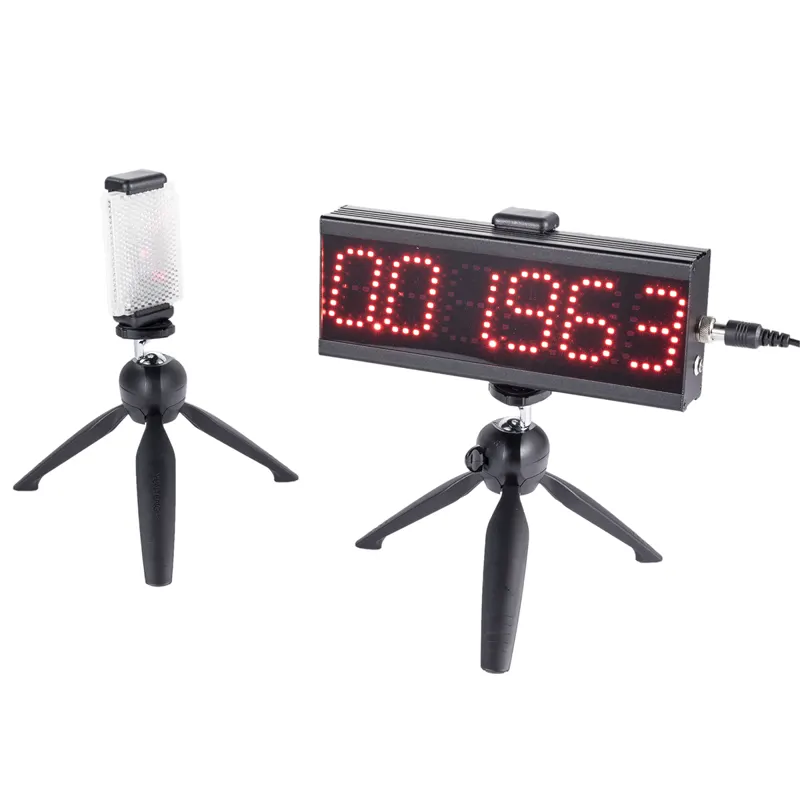
S-002 Equipment Setup for Same-Point Shuttle Runs
Define the course and athlete rules in the shuttle-run timing protocol guide first. This page begins with the equipment setup: placing the S-002 at the shared start and finish point, checking the return trigger and keeping each recorded attempt tied to the same layout.
Choose the turn distance first
Write the test name and turn distance on the session sheet before unpacking the timer. A 5 m turn, a 10 m turn and a longer conditioning shuttle are different tests even when they use the same equipment. Mark the far line with tape or a flat marker that will not move under foot traffic.
The S-002 product page describes a single-person turn-back laser timer for agility testing, shuttle runs and school fitness tests. Its job is to measure the return to the original timing position, not to judge whether an athlete touched the line correctly. Keep that rule with the coach or observer.
Build the same-point layout
Set the start and finish timing position at one end of the lane. Keep the two tripods stable and outside the running path. The product listing identifies a laser reflector and two tripods in the standard package, plus a 6-digit high-brightness LED display. Check the delivered package and follow the model's setup video before the first scored attempt.
Beam height matters. Align the beam with the passage you want to detect, then run a slow walk-through from the starting position to the turn line and back. The alignment and beam-height guide covers the checks to repeat after a stand is moved.
Separate the turn rule from the timing rule
Tell athletes exactly what counts as a turn. For example, the front foot must reach the line before the athlete returns. The timer records the crossing at the start and finish position; a coach still needs to watch the far line and mark an invalid trial when the rule is missed.
| Session item | Keep fixed | Write down |
|---|---|---|
| Start | Body position and starting command | Self-start or command start |
| Turn | Line location and touch requirement | Distance and validity rule |
| Finish | Return through the same beam | Elapsed time and attempt number |
| Surface | Lane, slope and traffic pattern | Indoor, turf or track surface |
Run one unscored rehearsal
Use a walk or controlled jog to confirm that the display reacts when the athlete leaves and returns. The product page lists DC 5V 2A power and timing accuracy up to 0.001 second. Those published figures describe the system; they do not remove the need for a clean beam, a clear lane and a consistent turn.
After the rehearsal, reset the display and label the first scored attempt. If a person crosses the timing position while another athlete is waiting, pause and restart the trial rather than guessing which passage belongs to which name.
Record every valid attempt
Use one row per attempt: athlete ID, date, turn distance, start rule, surface, result, validity and note. Store the fastest valid time only after all trials are entered. For a broader roster process, use the repeatable athlete testing workflow and keep the same column names across sessions.
When another setup makes more sense
The S-002 suits one athlete returning through the original timing point. A session that needs two lanes, several intermediate splits or a configurable number of gates should be planned around another model. The timing-system selection guide lays out those trade-offs without changing the shuttle protocol halfway through.
Field rule: the turn line is part of the measurement. Move it, and you have started a new test.