01TIMER.COM / Timing system guides / CS-003 comparison
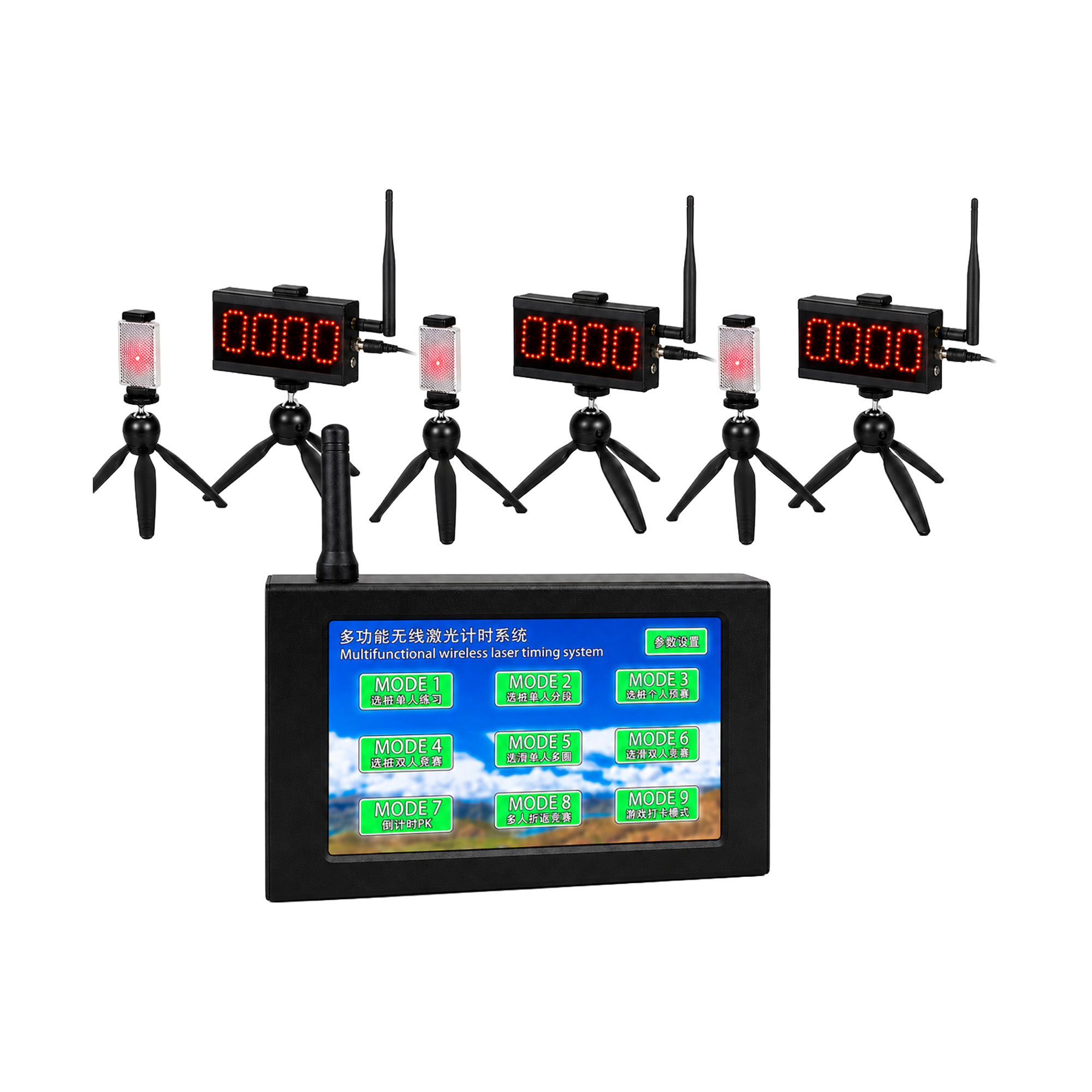
How to Choose Between CS-003 and CS-003 PRO Systems
A model name cannot decide whether a timing system fits a training center. Sketch the session first, then compare the standard compact package with the higher CS-003 PRO package against the same operating plan.
What the current product pages establish
The CS-003 Multifunctional Laser Timing System is described as a compact laser timing kit for multifunctional training setups. The page points to training centers, clubs and compact test lanes. Its listed package direction includes a controller, laser sensors, a tripod kit and a carry case, with final contents depending on the package.
The CS-003 PRO Multifunctional Laser Timing System is described as a pro compact laser timing kit and a higher package option for the same broad user group. The page also lists a controller, laser sensors, tripods, accessories and a carry case by package. The word PRO alone does not tell you which extra item solves your session problem.
Use one comparison sheet for both models
| Question | CS-003 | CS-003 PRO |
|---|---|---|
| Published position | Compact multifunctional laser timing kit. | Pro compact laser timing kit and higher package option. |
| Likely planning context | Compact training lane with selected timing modes. | Training center or club that needs the confirmed higher package. |
| Package direction | Controller, laser sensors, tripod kit and carry case by package. | Controller, laser sensors, tripod kit, accessories and carry case by package. |
| Display | Optional LED display can be quoted. | Optional LED display can be quoted. |
| Still requires confirmation | Operating mode, gate count, exact contents, power, timing accuracy and communication conditions. | |
A comparison is useful only when both columns answer the same session questions. If one quote assumes a two-point sprint and the other assumes multiple stations plus a display, the package names are not the reason for the price or hardware difference.
Choose the timing mode before the package
Name the output in plain language: one total time, intermediate splits, repeated laps, a commanded start or another mode supported by the confirmed system. Then draw each trigger in order. This exposes whether the lane needs two timing points, several points or a different workflow altogether.
The CS-003 timing-mode planning guide provides a useful worksheet for this step. It separates the event sequence from the equipment list so that an operator can explain what must happen before discussing components.
Count stations and operators
Mark the physical position of the controller, every sensor, each reflector or receiver and the person supervising the lane. Add athlete waiting areas and a clear run-out. A compact training room may need careful traffic control even when the timed distance is short.
Next, assign the operating tasks. One person may call athletes, check the beam and record results in a quiet individual session. A busy center may need a second person to manage the queue and invalid trials. The package should support the chosen lane, but it cannot replace an operating plan.
Decide whether visible results matter
Both product pages state that an optional LED display can be quoted. Write down who needs to see it: the operator, athlete, coach across the room or an audience. Measure the viewing direction and available placement before choosing display size or mounting hardware.
If public visibility is important, read the timing display visibility guide. For a package-level comparison, the ML-01 and X-001 PLUS fit guide keeps viewing distance, result source and venue constraints separate.
Ask for package-specific confirmation
Send the supplier the model under consideration, the timing mode, number of points, venue type and display requirement. Ask for a written component list. Confirm charging and power accessories, mounting parts and the items supplied for each timing station.
Communication distance and timing accuracy are marked for confirmation by model, mode and site conditions on the current pages. A quoted number without those conditions can mislead the buyer. Describe walls, field size and other practical constraints when requesting advice.
Plan the first session before delivery
- Prepare a lane diagram with measured timing points.
- Name the selected operating mode and the expected result.
- List the people responsible for setup, athlete release and record review.
- Create an inventory from the final order confirmation.
- Schedule a controlled equipment check before testing a full group.
The alignment and beam-height guide covers the physical check at each point. Store raw attempts using the timing data and roster workflow so that invalid trials remain visible.
Make the choice from the unresolved requirement
If the compact CS-003 package is confirmed to support the complete lane, adding a higher package without a defined need may add equipment rather than clarity. If the planned workflow requires components present in the confirmed CS-003 PRO package, document that requirement and compare the full order, not the model label.
Buying rule: choose CS-003 or CS-003 PRO only after the supplier has mapped the requested timing mode to a written package list. Keep that confirmation with the setup diagram.
Questions about CS-003 and CS-003 PRO
Is CS-003 PRO automatically more accurate?
The current pages tell buyers to confirm timing accuracy by model and operating mode. Do not infer an accuracy difference from the PRO name.
Are the package contents fixed?
The pages describe contents by package and offer configured quotes. Use the final order confirmation, not a general comparison article, as the inventory source.
Where should a buyer begin?
Begin with the lane, timing sequence, operator count and display need. Then use the quote request to confirm which package matches those requirements.